

Add Watermark to PDF
Securely protect your documents by adding text or image watermarks instantly online.
What Is the Watermark PDF Tool?
The Add Watermark to PDF tool by PDFZora allows you to stamp your documents with custom text (like "Confidential" or "Draft") or your company logo to assert ownership and protect your intellectual property. It's fast, free, and runs entirely in your browser without any software installation.
How to Add a Watermark to PDF Online (Step-by-Step)
Upload your PDF file
Click the "Select PDF files" button or drag and drop your document into the upload area to get started.
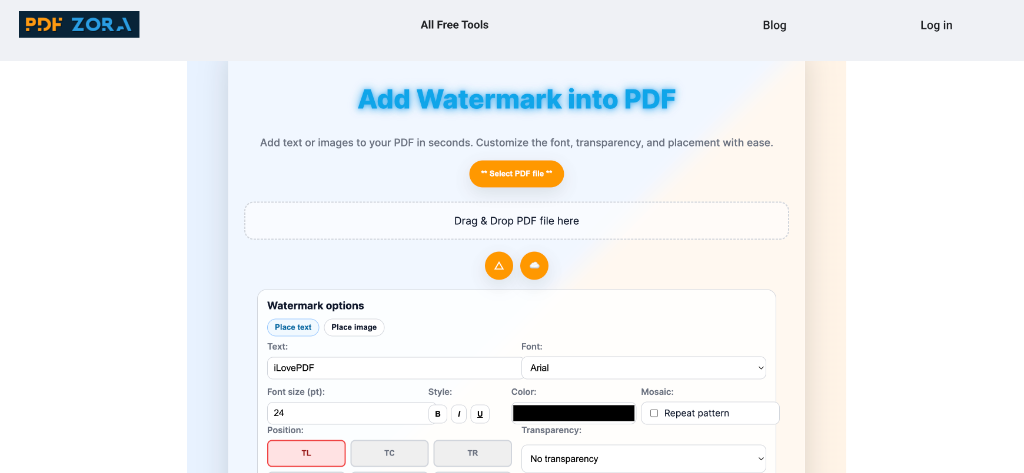
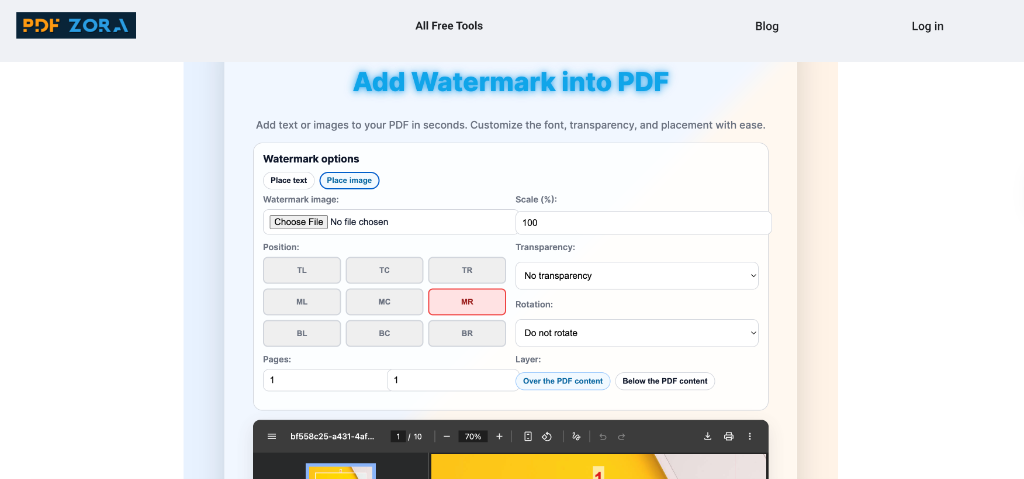
Customize your Watermark
Choose between "Text" or "Image". Type your text or upload a logo, then adjust the position, transparency, and rotation to your liking.
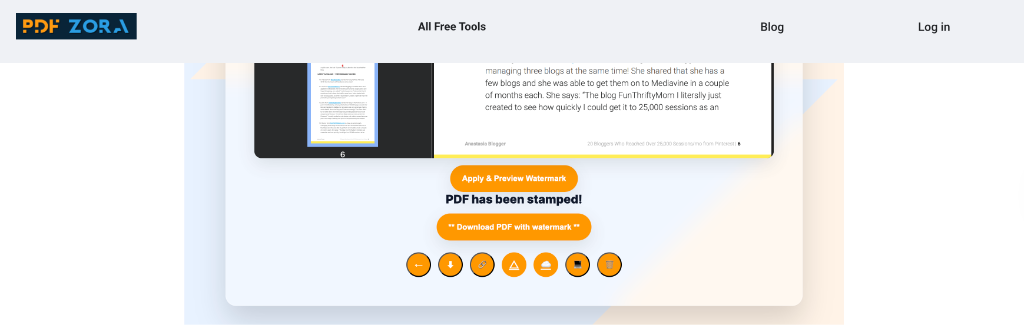
Download the protected PDF
Click "Add Watermark" to process your file, then download the newly watermarked document instantly.
Supported Watermark Types
We provide flexible options to suit your needs:
- Text Watermarks: Add words like "Confidential", "Top Secret", or "Sample". Customize font, size, color, and transparency.
- Image Watermarks: Upload your logo or any image file (JPG, PNG) to stamp onto your PDF pages.
Why Use PDFZora to Watermark PDFs?
PDFZora offers a premium watermarking experience that is both simple and powerful:
- Full Customization: precise control over opacity, rotation, resizing, and positioning tiles.
- Batch Processing: Watermark dozens of files at once to save time.
- Zero Cost: Enjoy professional-grade tools without paying for expensive software licenses.
Key Features
- Adjustable Transparency: Make your watermark subtle or bold by tweaking the opacity slider.
- Layer Positioning: Choose to place the watermark above or below the content.
- Cross-Platform: Works perfectly on Windows, Mac, Linux, and mobile devices.
- Cloud-Based Speed: Heavy processing is handled by our servers, not your device.
Online vs. Offline Watermarking
Why install bulky software just to stamp a document?
| Feature | PDFZora Online | Offline Software |
|---|---|---|
| Cost | 100% Free | Expensive |
| Convenience | Instant | Requires Install |
| Updates | Automatic | Manual |
Is It Safe?
Security is paramount at PDFZora. We use advanced SSL encryption to protect your files during transfer. Furthermore, all uploaded and processed files are permanently deleted from our servers after 60 minutes, ensuring your sensitive documents remain private.
Common Use Cases
- Copyright Protection: Prevent unauthorized use of your creative work.
- Corporate Documents: Mark internal drafts or confidential memos.
- Invoicing: Stamp "PAID" or "OVERDUE" on financial documents.
Frequently Asked Questions
Yes, PDFZora is completely free to use. You can watermark as many files as you need without cost.
Yes, simply select the "Image" option and upload your logo file (PNG, JPG) to place it on your PDF pages.
Yes. We use SSL encryption and automatically delete all files after one hour to ensure your privacy.
Yes, our Batch Processing feature allows you to upload and watermark multiple PDF files at once.
Yes, you can easily minimize the visibility of your watermark using the transparency slider to ensure text remains readable.
To remove a watermark, you would typically need a PDF Editor tool if you don't have the original file. PDFZora also offers tools to edit PDFs.
By default, yes. However, our advanced settings allow you to select specific page ranges if you only want the watermark to appear on certain pages of your document.
No. PDFZora ensures that your original document's quality, formatting, and resolution remained 100% intact while adding the watermark layer.
Explore More Tools
Protect PDF
Encrypt your PDF files with a password to prevent unauthorized access.
Merge PDF
Combine multiple PDF documents into a single file instantly.
Add Page Number
Add page numbers to your PDFs effortlessly. Customize size and position.
Compress PDF
Reduce the file size of your PDF while maintaining high quality.
PDF to Word
Convert PDF files to editable Word (DOC, DOCX) documents effortlessly.

Find & Replace Text
Detects all instances of a word or phrase and replaces them across your PDF.
Ready to Watermark Your PDF?
Secure your documents with a custom stamp in seconds. Whether you're a legal professional protecting confidential contracts, a photographer safeguarding your portfolio, or a business owner branding your invoices, PDFZora provides the ultimate free solution. Our tool offers enterprise-grade security, lightning-fast processing, and complete customization without the need for expensive software subscription. Start protecting your intellectual property today with the most reliable online PDF watermarking tool available.
Get Started Now